How to upgrade from AirBuddy 2 to AirBuddy 3
AirBuddy 3 is a major upgrade that requires macOS 14 or later and an AirBuddy 3 license. Your AirBuddy 2 license remains valid for AirBuddy 2.
Before you upgrade
- Make sure the Mac is running macOS 14 or later.
- Keep your AirBuddy 2 license key or purchase email available. Prefer using the license key if you know it, as using an email will require you to check your inbox for your upgrade details before proceeding.
- Install AirBuddy 3 on every Mac that participates in Magic Handoff. AirBuddy 3’s Magic Handoff protocol isn’t compatible with AirBuddy 2.
Upgrade your license on the web
- Visit airbuddy.app.
- Click the "Check upgrade offer" button.
- Enter your AirBuddy 2 license key or purchase email.
- Follow the instructions to claim an available free or discounted upgrade.
- After completing the checkout, you will see your new AirBuddy 3 license key and a button to download the app. Use your AirBuddy 3 license key to activate the app after installing it.
Install AirBuddy 3 after upgrading
- Download AirBuddy 3 from the purchase confirmation page, or click the download button on the website and select AirBuddy 3
- Double-click the DMG file that was downloaded
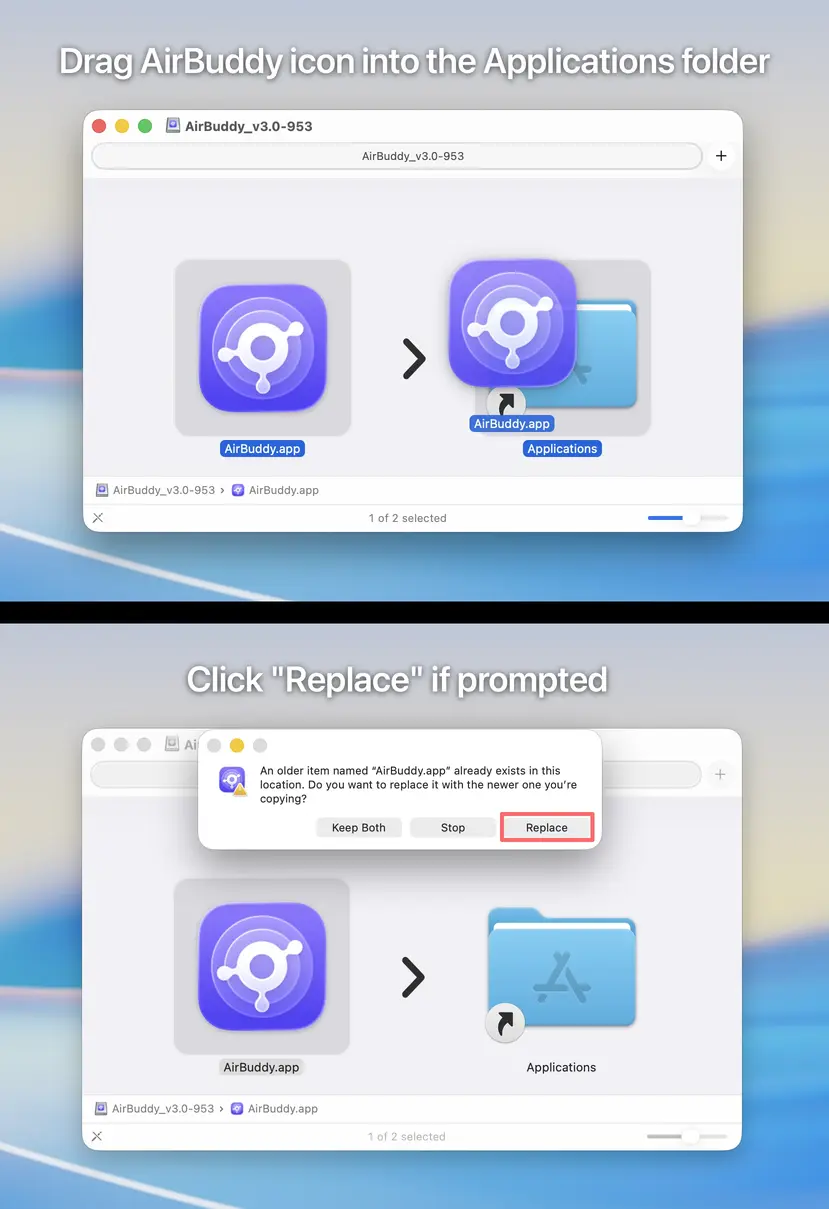
- Drag the AirBuddy icon into the Applications folder; choose "Replace" if prompted
- Close the Finder window and launch AirBuddy from your Applications folder so that it can update its components
- Follow the on-screen instructions
Upgrade your license in AirBuddy 3
- Download and open AirBuddy 3.
- In the setup assistant, choose the option to upgrade an AirBuddy 2 license.
- Enter your AirBuddy 2 license key or purchase email.
- Follow the instructions to claim an available free or discounted upgrade.
- Enter the AirBuddy 3 license key and email associated with the purchase when prompted.
If you already have an AirBuddy 3 license, choose the activation option instead and enter its license key and email.
Settings and devices after upgrading
AirBuddy preserves compatible settings, device information, and Magic Handoff pairings where possible. Some features have changed:
- Connection Modes have been removed. Use a personal automation in Shortcuts to configure audio settings when AirPods connect.
- The status window and notification HUD are now the Action HUD.
- AirBuddy 3 no longer requires a separate in-app pairing process for trusted iPhone and iPad devices.
- All Macs using Magic Handoff must run AirBuddy 3.
If you need to keep using an older version of macOS, download AirBuddy 2 and refer to the AirBuddy 2 documentation archive.