How to use Focus Filters with AirBuddy
AirBuddy’s Focus Filters can prevent selected automatic Action HUD events while a Focus is active. You can filter AirPods status, Now Playing, and Battery Alerts independently.
Add the AirBuddy Focus Filter
- Open System Settings.
- Select Focus, then select the Focus you want to configure.
- In Focus Filters, click Add Filter.
- Select AirBuddy.
- Choose which AirBuddy events to prevent, then click Add.
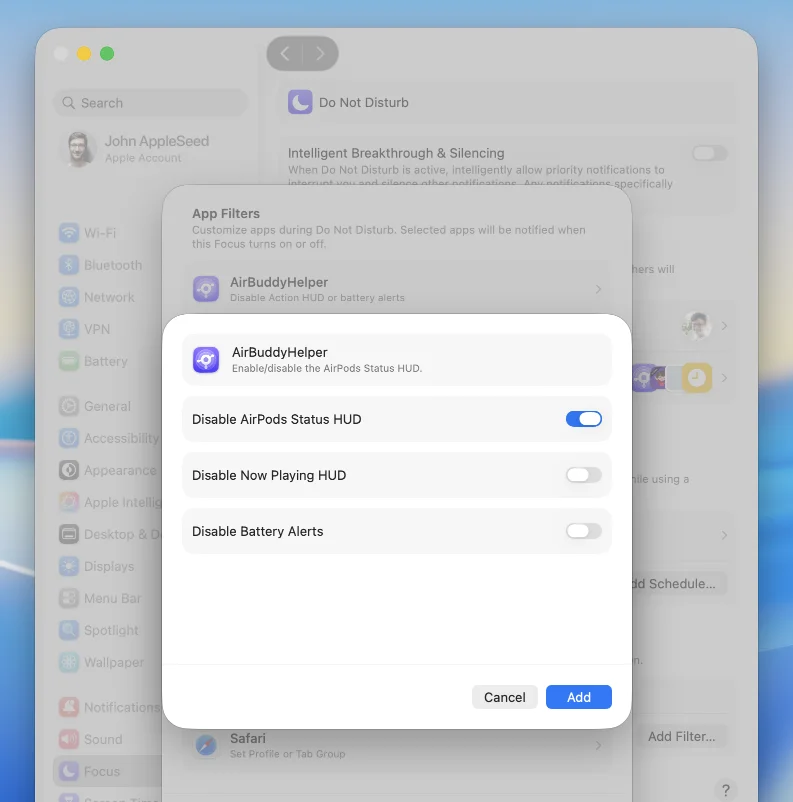
The filter applies while that Focus is active. Repeat these steps for any other Focus that needs different AirBuddy behavior.
Manually requested interfaces, such as showing the AirPods Action HUD with a keyboard shortcut, remain available.
To choose which events are enabled when no Focus Filter prevents them, open AirBuddy settings, select Action HUD, then click Choose beside Show Action HUD when.